.png)
Playing back DCPs
If you've created a Digital Cinema Package (DCP) on CineSend, or anywhere else for that matter, your first instinct might be to try and open the DCP to watch it for yourself.
In simple terms, a DCP is a folder containing a collection of metadata and media files that a Cinema Server uses to play back your film. The underlying video and audio data are stored in MXF files, and information about what that data is and how to play it properly is stored in various XML files. Your DCP will have a minimum of six files (there may be more) looking something like this example:
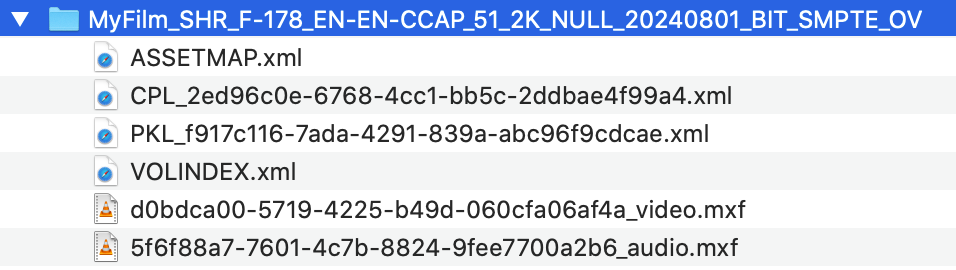
The format is organized and stored in a way to make playback convenient for specialized theatre equipment - not to make make it easily human readable, or playable on consumer computers. While there are some software-based DCP playback options, the quality and accuracy they provide varies greatly and doesn't necessarily replicate how the film is will look in an actual theatre screen. This for a few reasons:
- DCPs are in X'Y'Z' color space. Standard computer monitors cannot display this color space correctly, so the image either looks distorted or has to be converted to other colors which are approximations, not the actual values.
- DCPs are playlist based. Your DCP might have several separate audio and video files that may each have in/out points and offsets that need be interpreted by the player.
- DCPs are encoded with JPEG2000. This codec requires a very powerful computer to play back in real time without stutter or dropped frames.
If you purchased your DCP on CineSend, rest assured that your DCP was screened on properly calibrated professional equipment before it was delivered back to you to ensure it matches your source files as closely as possible. If you have any specific questions or concerns, get in touch with us and we'd be happy to discuss them further.