.png)
DCP Magic Support FAQ
Thank you for choosing DCP Magic for your DCP creation needs! We appreciate working with you and look forward to doing an excellent job with your order.
Find quick answers to the most commonly asked questions below.
- How long will it take to create my DCP?
- What format do I need to upload?
- How should the audio be formatted? Is Stereo ok?
- How should I deliver 5.1 audio files?
- What container frame is right for my DCP?
- How do I adjust the framerate to DCP standards?
- Can I add subtitles or captions to the DCP later?
- I need closed captions for my DCP. Can CineSend make those for me?
- Should I make a 4k DCP?
- What is the best way to download my DCP?
- What will the DCP look like after I download it?
- Can I watch the DCP on my computer to review it?
How long will it take to create my DCP?
Standard DCP turnaround is 3 business days for quality control by our technicians, but often orders are completed sooner. As soon as the DCP has been completed, we will send you a notification. A one-day rush option is also available.
What format do I need to upload?
We can work with all common resolutions and video codecs. Normally we reccomend sending us your film in an "intermediate codec" (Like ProResHQ or DNxHQ) in your native frame rate and resolution.
However we have made excellent quality DCPs from a wide range of different source files. ProResHQ .mov files and high bitrate H.264 .mp4 files are the most common.
How should the audio be formatted? Is Stereo audio ok?
Technically Stereo DCPs are not strictly valid by the SMPTE specifications, however we are not aware of any major festials or theatre chains that will not accept DCPs made in stereo.
To be 100% standards compliant, your DCP should be in 3.0 (L/C/R) or 5.1 (L/C/R/LFE/Ls/Rs) audio - however a huge number of DCPs are made in Stereo each year with no issues. We always reccomend filmmakers use the audio mix they are most confident in. A Stereo mix you are confident in will almost always sound better than a 5.1 mix made without the ability to mix or review it properly.
How should I deliver 5.1 audio files?
You can either include 5.1 audio as a 6-channel master file with your video master, or as a separate audio file (either a 5.1 combined .wav, or as 6 separate mono .wav files). Separate audio files can either be program-only, or contain sync marks (2-pop and beep) but need to match the submitted video file.
What container frame is the right choice for my DCP?
Our team will select the correct container frame size based on your film's active picture area, so that the film will project properly in all theatre setups. You do not need to make a special export for us in a special size - just send us your native timeline size - we will deal with any pillarboxes or letterboxes during processing.
How do I adjust the framerate to meet DCP standards?
Many modern productions are shot and edited in fractional frame rates like 23.98 or 29.97 fps, but DCPs require whole-number frame rates: 24, 25, or 30 fps. Do not worry, as part of the DCP creation process the conversion to a whole-number framerate is taken care of for you. Just send your master in the native frame rate, and we will find the best option for your DCP.
Can I add subtitles or captions to my DCP later?
Unlike some other digital video formats, text tracks need to be properly encoded into the DCP itself rather than attached afterwards. Open captions, subtitles, and closed captioning for accessibility devices also all have different requirements and best practices. If possible - providing those tracks when you create your DCP will save you money having to add them later down the road.
I need closed captions. Can CineSend make those for me?
CineSend does not create closed captioning. If you don't have a captioning house that you work with what we often recommend as an affordable workflow is to use an online service (like REV captioning service - although there are other similar options). Many of the most affordable services have quality that isn’t always 100% accurate - so pick one that allows you to watch through your film with a built-in editor to make final tweaks or corrections yourself.
Once you're happy with the output, you can download the final (edited) file which can be uploaded to us as part of your DCP order. We suggest VTT as an output file as it can be used for many different platforms and preserves positioning and styling information.
My film is shot in 4k, do I need a 4k DCP?
DCPs are cross-compatible, so 2K and 4K DCPs will both play on any DCP projector.
The vast majority of projectors in the world are only 2K and there are some (small) advantages to mastering in native projector resolution (so a 2K DCP may look slightly better on a 2K projector than a 4K DCP scaled on a 2K projector). 2K DCPs are also more economical to create. That being said, it's ultimately a personal choice and there's no wrong answer. Many filmmakers like to "future proof" their DCPs by creating 4K DCPs for when higher resolution projection becomes more common in the future.
What is the best way to download my DCP?
We strongly recommend using Aspera for uploading and downloading DCPs. Aspera corrects errors in real-time, lets you pause and resume long transfers without having to start over, and allows entire DCP file systems to be transferred easily and reliably. Downloading DCPs over regular browser downloads, or using commercial cloud systems often leads to corruption where they no longer work properly.
To use Aspera your computer will have to have the Aspera Connect plugin installed. You might have it already, but if not, download and run the correct installer for your operating system:
If you are using the Chrome web browser, you also need to install the Aspera extension for Chrome from the Chrome Web Store. Other browsers (Firefox, Safari, etc.) do not require this extra step.
Once Aspera is installed you can click on the "Upload Using Aspera Connect" or "Download using Aspera Connect" buttons in DCP Magic and Aspera will start automatically.
What will the DCP look like after I download it?
A DCP is a folder with a minimum of six files inside like this example:
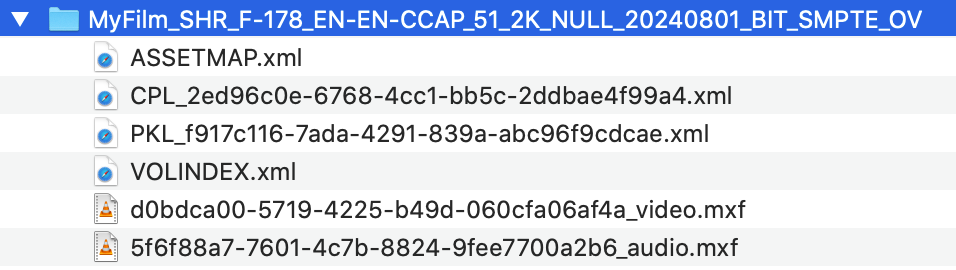
Some DCPs will have more than six files, but there must be at least six. The title of the folder should follow the Digital Cinema Naming Convention and is important to leave as is - it matches information that's hard-coded inside the DCP itself. When you send a festival or cinema your DCP, you will send them the complete folder with all the files inside.
Can I watch the DCP on my computer to review it?
DCP's (the file format) are not playable on most regular computers without special hardware or software - it's a format specifically for professional movie theatre projectors. There is some software that can mimic it, but usually playback is not accurate to what you would see in a theatre (and it does not replicate how theatre equipment actually loads or plays the contents). But you can download the file to a computer for storage and to send to theaters or festivals in the future (either electronically or on a hard drive).